
Application settings
Open System > Settings with permission to edit settings. Expand a category using its arrow and review the current values. These are shared application settings; the toolbar’s light/dark and density controls are separate appearance choices.
Change a value
- Expand the relevant category.
- Read the field label and its description or tooltip. Check units such as days, seconds or hours/minutes/seconds.
- For a linked value, click it to open the editor, enter the new choice and click Save. Cancel discards the editor.
- Review the value in the settings tree after saving.
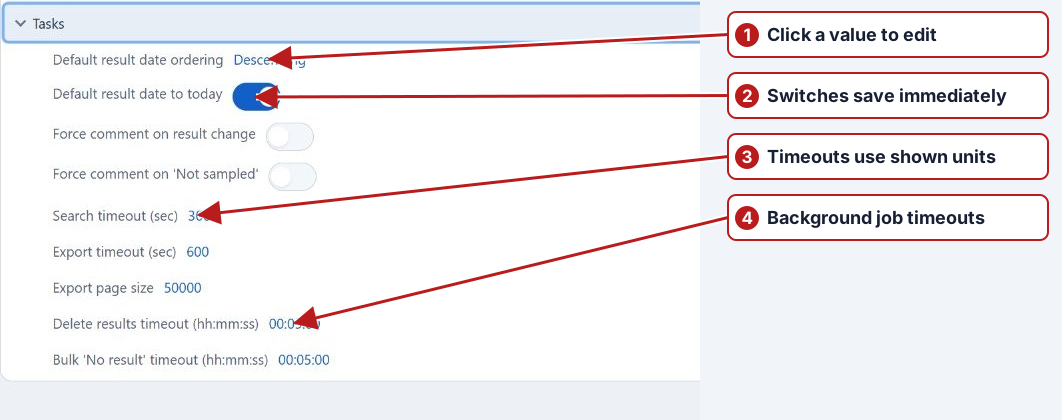
Tasks: result-entry defaults and processing
| Setting | Purpose |
|---|---|
| Default result date ordering | Choose earliest-first or latest-first result ordering. |
| Default result date to today | Controls the initial result date offered by result entry. |
| Force comment on result change | Requires an explanation when changing a result. |
| Force comment on “Not sampled” | Requires a reason when recording that collection did not take place. |
| Search timeout / Export timeout | Time allowed for those Tasks operations, in seconds. |
| Export page size | The batch size used by export processing; this differs from the browser’s visible page size. |
| Delete results timeout / Bulk “No result” timeout | Time allowed for the corresponding background operation. |
Schedule
Review Days before program change applied, Allow results in future, the result/sampling date tolerance and Enforce sampling. Default scheduled test duration, in days supplies the initial period when scheduling by drag and drop; it must be greater than zero. See Program system settings for the scheduling explanations and Scheduler for manual work.
Import
| Setting | Purpose |
|---|---|
| Provider | Select Off, IMAP or MS Graph for automatic import collection. Mailbox configuration must also be correct. |
| Cron expression | The schedule for automatic import collection. |
| Assert duplicate results | Controls duplicate-result checking during import. |
| Import jobs timeout | Maximum allowed import-job runtime; observe the restart instruction on its label. |
These processing settings do not replace the organisation’s identifier attributes or column mappings. See Import setup and troubleshooting.
Other categories
| Category | What to review |
|---|---|
| Browser | The Web site URL used by related application links. |
| Company | The tenant time zone used by the application. See Dates. QR output dimensions are chosen in the separate Generate QR codes dialog. |
| Delivery configuration used by application emails. | |
| Issue tracker | The support issue-tracker integration. |
| Map | Map configuration used by location views. |
| Notification | The processing schedule, email template and maximum event age included in notifications. Recipient rules and groups are defined separately. |
| Reporting | Report-ready email, scheduled-report processing, designer caching and report/query timeouts. Individual report schedules remain on the report definition. |
Use Email notifications, Report schedules and Background jobs to follow the related workflows.