Parameter limits
Limits define acceptable values for a parameter at specified sample points or groups. Open Parameters > Limits to search and maintain them.
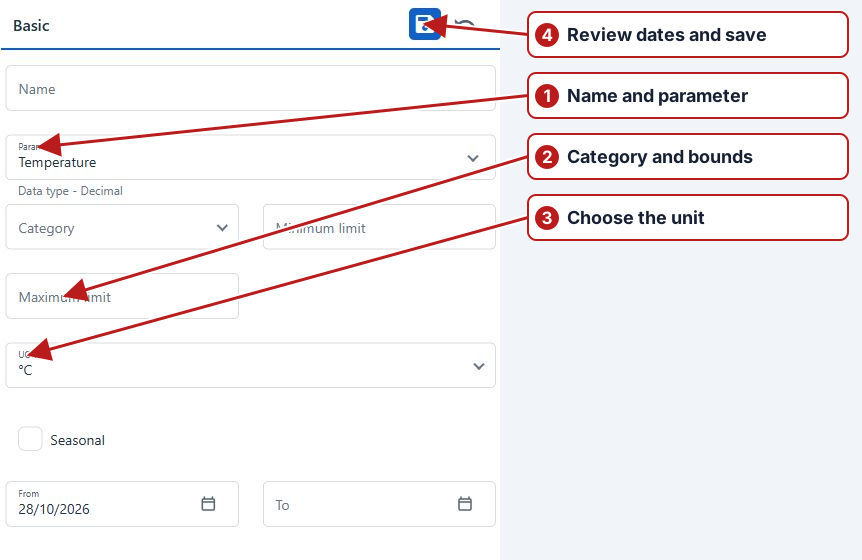
Choose a category
- Data entry
- Rejects values outside the allowed entry limits.
- Alert
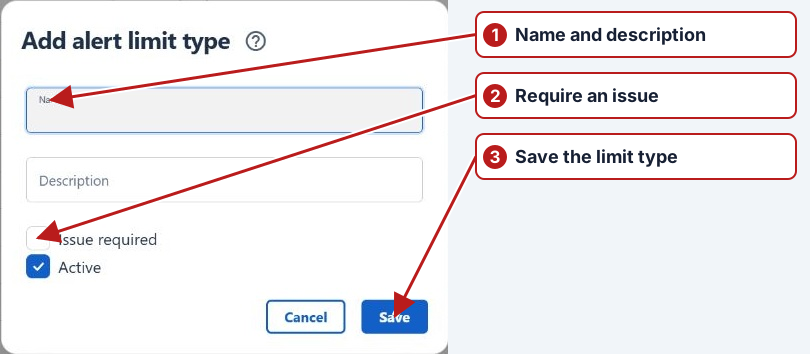
- Flags a value that needs review. Select an Alert type to define the classification and whether an issue is required.
Define values and dates
Numeric limits use Minimum limit and Maximum limit. Lookup or Boolean parameters use Breach value and, where applicable, Non-breach value. Select the correct UOM when offered. From, To and Seasonal determine the applicable period.
Set locations
After saving the Basic attributes, use Sample points and Sample point groups to add applicable locations. Select a location and use Add. A limit with no locations is marked inactive in the Limits table.
See Add a limit and End a limit’s applicability.
Choose scope and dates
After saving the limit, assign the intended sample points or groups. Review From/To and Seasonal where offered. A definition with no location scope is inactive; a correctly entered threshold is insufficient without applicability.
Worked unit comparison
If a limit uses mg/L and a laboratory reports µg/L, use the configured compatible conversion before comparing values. For example, 250 µg/L equals 0.25 mg/L. Check the selected category and alert type separately from the numeric bound.