
Investigate calculated results
Use Data > Tasks to inspect a calculated result and the measurements behind it. A calculated parameter’s method expression defines the calculation; the result’s dates, location and source measurements determine the actual outcome.
Open calculation details
- Filter Tasks to the intended parameter, sample point and period, then Search.
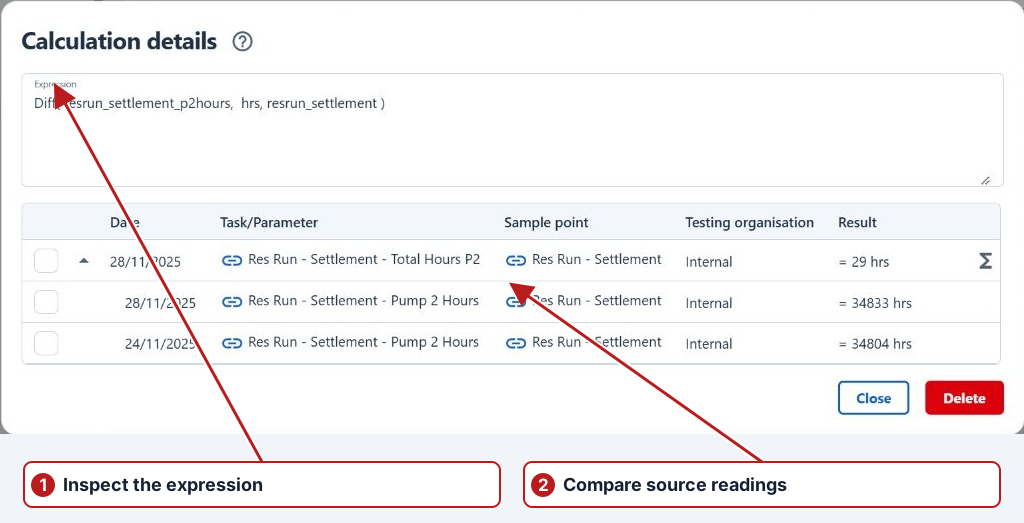
- Select a recorded calculated result. Double-click it, or choose Open from its row menu to display Calculation details.
- Read the Expression and expand the result rows to inspect the source measurements.
- Check each source’s parameter, sample point, organisation, date, qualifier and value. Review comments and attachments where shown.
Work through an unexpected value
| Check | Example |
|---|---|
| Expression and units | For Parameter_A + Parameter_B, confirm the two inputs represent quantities that can be added. |
| Location | A cross-location reference may intentionally use a different sample point. Confirm that it is the intended one. |
| Source period | A rolling average reads a period of measurements, not necessarily the single result nearest the output date. |
| Missing or qualified inputs | Pending, No result and “less than” values have different meanings. Do not treat missing measurements as zero. |
| Corrections | Use Result history to establish whether a source was edited after the original calculation. |
For example, an average that appears too high can be caused by one incorrect source reading, the wrong reference period or the wrong point reference. Resolve the relevant source or method through its normal authorised edit workflow, then review the calculation again.
Calculate or recalculate
- Close Calculation details and select the intended calculated task in Tasks.
- Choose Calculate for an unrecorded calculation or Recalculate for an existing calculated result, where offered.
- Review and accept the confirmation. The calculation runs in the background.
- Check Notifications, then refresh the task search and inspect the new result and its sources.
Calculation details also offers Delete. Use it only when removing the calculated result is intended; close the dialog to finish a read-only review.
See Parameter expressions for expression semantics and Parameter methods for method applicability.