
Issues
Issues track problems, investigations, causes and corrective actions. Open Issues > Issues, apply filters and search to find the records you need.
Work with an issue
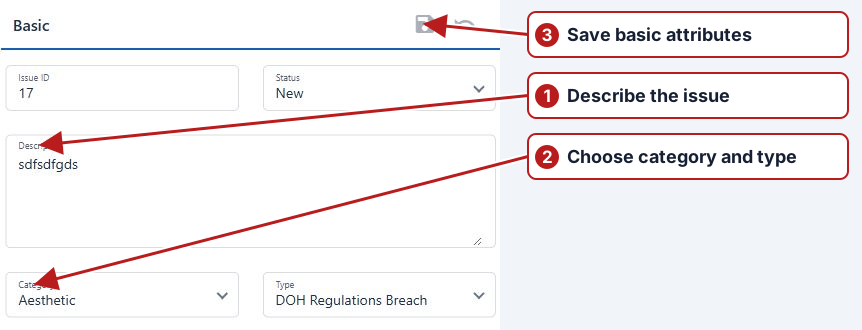
Use Add new to create an issue, or open an existing issue from the results table. Its tabs contain Attributes, Causes, Actions, Other info, Child issues, Map and History.
See Create an issue and Issue status.
Choose the investigation context
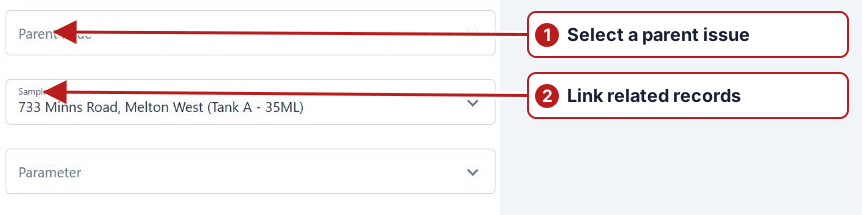
A manually created issue can cover a maintenance, safety, security or delivery problem as well as a non-conformance. Record the observed time, assign responsibility and select a relevant sample point/parameter when applicable. Use comments and custom attributes to preserve useful context.
Cause, action and history
After saving, add the cause and corrective action with their explanations. An existing issue needs at least one of each before Resolved or Closed. Inspect History to understand changes, and Child issues for related investigations.
Notifications
Issue handling can notify the assigned and creating users through configured delivery. Additional notification rules/groups can cover wider event-based recipients. Confirm the recorded event and delivery setup when investigating missing mail.
Maps and follow-up work
See Issue maps and follow-up tests for additional locations, map snapshots, scheduled tests and links to existing results.