
Background jobs
Some operations continue after the app accepts your request: result exports, report runs, calculations, imports and bulk updates. System > Background jobs shows processing states and recurring service jobs. Open it when a request appears to be waiting or has failed.
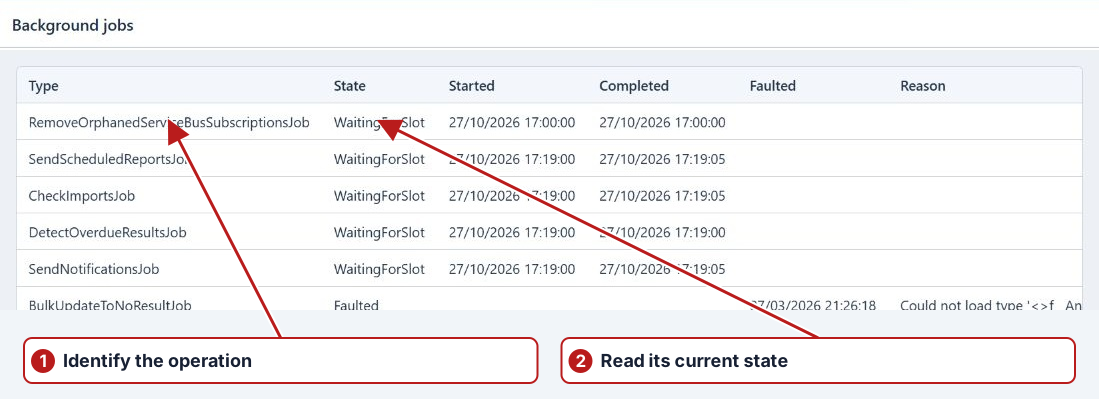
Read a job
| Column | What to check |
|---|---|
| Type | The operation being processed, such as RunReportJob or CheckImportsJob. |
| State | Whether the job is waiting, starting, running, completed, cancelled or faulted. |
| Started / Completed / Faulted | Processing timestamps. Compare these with the request you are investigating. |
| Reason | The failure or processing message. Record it when asking for support. |
| Cron / Next start | The recurrence and next planned start of a scheduled service job. |
| User | The user associated with the operation, where available. |
Scroll horizontally when the later columns are outside the work area. The list updates as job states change.
Understand waiting and failure states
WaitingForSlot can be normal for a queued request or a recurring job waiting for its next run. WaitingToRetry indicates that another attempt is pending. Starting and allocation states precede Started. Faulted needs investigation of the Reason; repeatedly submitting the same request can create additional work without resolving the cause.
Available row actions
Select a row and open More. The available actions depend on its state and your access:
- Cancel
- Requests cancellation of a job in an eligible state. Check the resulting state and any records already affected by the operation.
- Finalise
- Finalises the job’s processing lifecycle. It is a recovery action, not a retry or a replacement for reviewing the operation’s result.
- Remove
- Available with permission to manage all jobs. Removes a stuck job through the administrator recovery workflow.
Collect useful troubleshooting details
Record the job Type, State, timestamps and Reason, along with the related report, import or task and the request time. Check Notifications and the originating page for the user-facing outcome. Cancelling a request does not establish that earlier changes have been reversed.