
Events
Events record actions and conditions such as imports, result changes, limit breaches and issue updates.
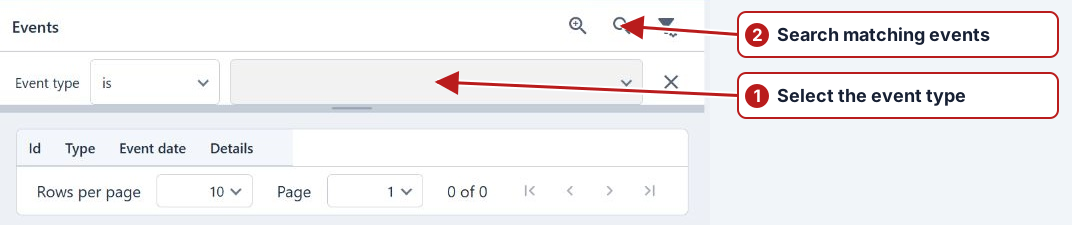
- Open Data > Events.
- Click Add filter and choose fields such as Date, Event type, Details or Program.
- Set their values and click Search.
- Double-click an event, or select it and choose More > Details.
The row menu offers navigation to related records when the event contains those links.
Choose filters that answer the question
Start with a relevant date range and event type, then narrow by the affected entity or scope where offered. For a file problem, use import-related activity around processing time. For a changed schedule, find Program changed activity and inspect its effective date and affected-task count.
Read the details
Open a matching event and read its message and associated records. An event type identifies the category, while its details explain what happened. Compare that evidence with the actual import record, issue or future task; a notification email is not a substitute for checking the recorded outcome.
Overdue results
Filter Event type to Result overdue to investigate a missed scheduled deadline. Details identify the parameter, sample point, testing organisation and scheduled end. One event is recorded per monitored scheduled result; later submission does not erase the fact. See Notify on overdue results to configure the monitoring scope and recipients.
Use events for support
Record the event time, type, relevant entity and the action leading to it. Include the processing message and file name for import issues, or the program and effective period for scheduling issues. Keep confidential file contents and credentials out of general support screenshots.