
Welcome to Aquantify
Aquantify helps your team schedule sampling and testing, record results, review limit breaches and follow up issues.
Work in the web app
- Data: sampling and result tasks, result charts, events, imports and reports.
- Parameters: parameter groups, limits, instruments and units of measurement.
- Samples: sample points, groups, sampling definitions and organisations.
- Schedule: programs and the scheduler.
- Issues: issue records and their categories, types, causes and actions.
- Manage and System: lookup types, attributes, notifications, settings, roles and users.
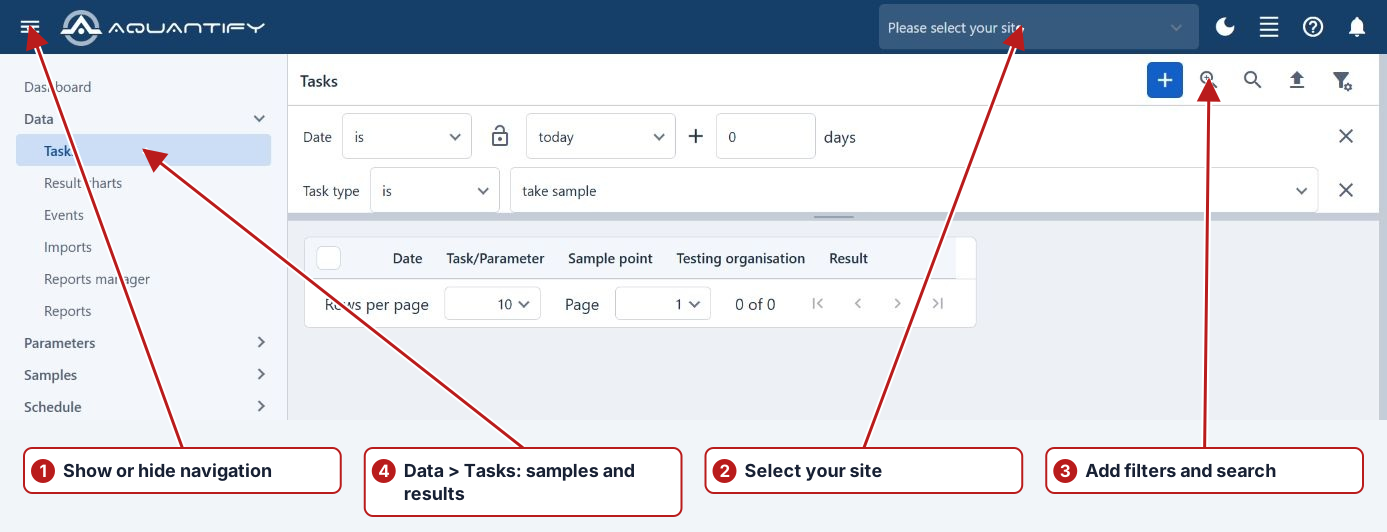
Start with User interface, System setup or How to enter results.
Follow the workflow
Define locations and measurements, configure the plan, record sampling/results, investigate exceptions and review the data. Data contains Tasks, Result charts, Events, Imports and reports. Parameters and Samples maintain definitions; Schedule defines Programs and browses Scheduler; Issues records investigations; Manage and System supply supporting setup and access.
Start with Workflow or User interface, then use the detailed topic for your task.
For current web features, start with Dashboards, Reporting and Notifications.