
Defining an organisation
An organisation identifies who samples or tests. Internal teams and external laboratories can both be represented. Programs can assign different sampling and testing organisations for the same sample definition.
Basic definition
- Open Samples > Organisations and search for an existing record.
- Open it to edit, or select Add new.
- Set Name and Description, and review External and Active.
- Save the Basic definition.
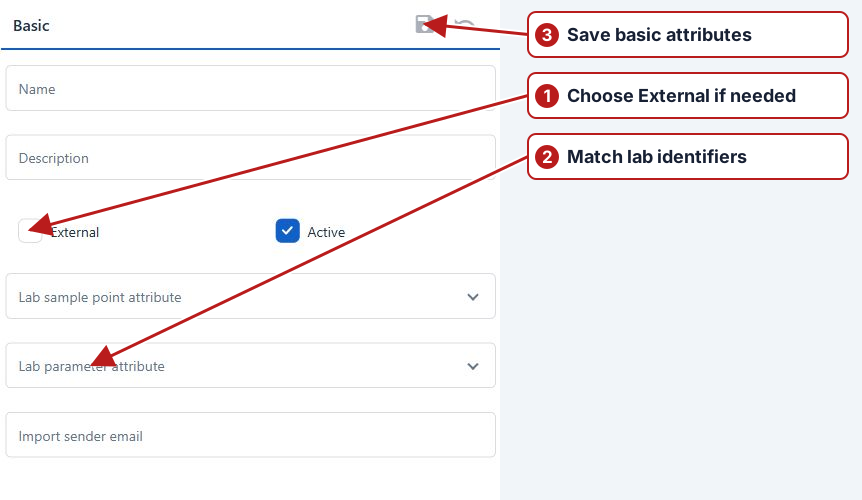
Laboratory identifiers
Choose the Lab sample point attribute and Lab parameter attribute containing that laboratory’s codes. Those attributes must be defined on the appropriate entity types and populated on actual sample point and parameter records.
Import columns and automatic receipt
Open Import column mapping on the saved organisation. Edit the relevant rows to match the file’s exact headings. Configure Import sender email when the deployment supports automatic receipt from that sender. The organisation definition alone does not configure the monitored mailbox service.
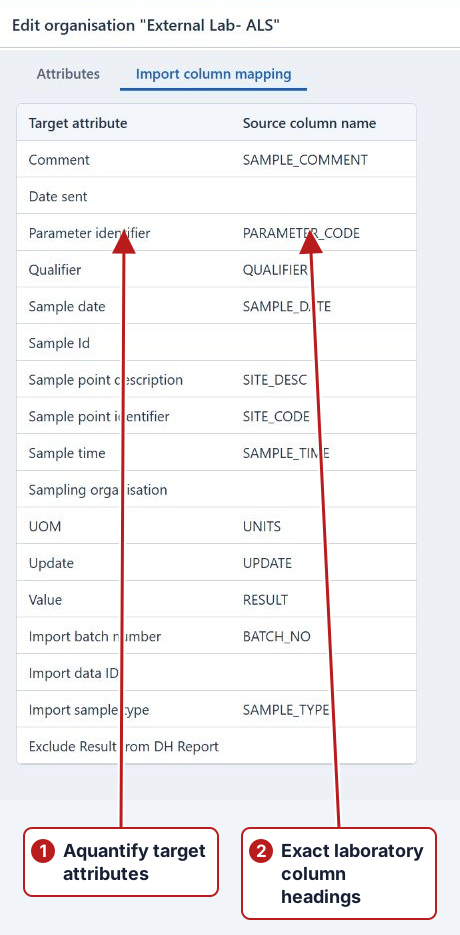
See Importing results for the full identifier, method, unit and file-validation workflow.