
Sample points and sample-point groups
A sample point is a specific location for a sample or measurement. Groups organise points for navigation, site selection, partition access, scheduling and other location-based definitions.
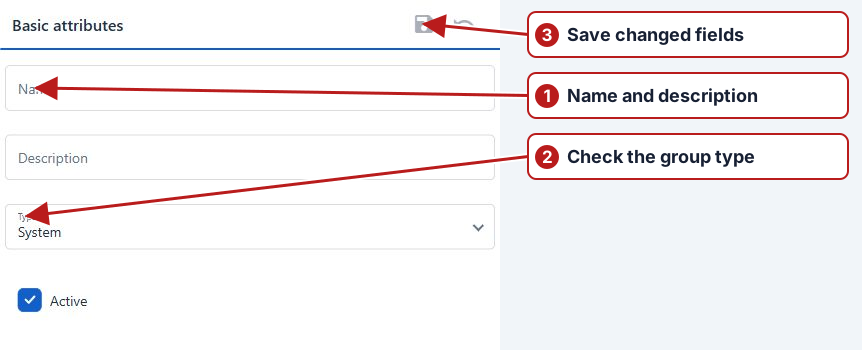
System, Site and ordinary groups
A System group defines a partition used by roles. A Site group represents operational location context. Ordinary parent groups can organise districts or activities without being separate business partitions or sites.
| Example | Type | Use |
|---|---|---|
| Drinking Water | System | Partition access |
| District One | Ordinary group | Hierarchy organisation |
| North Plant | Site | Working site and browser context |
| North Plant Inlet | Sample point | Measurement location |
Browse and maintain points
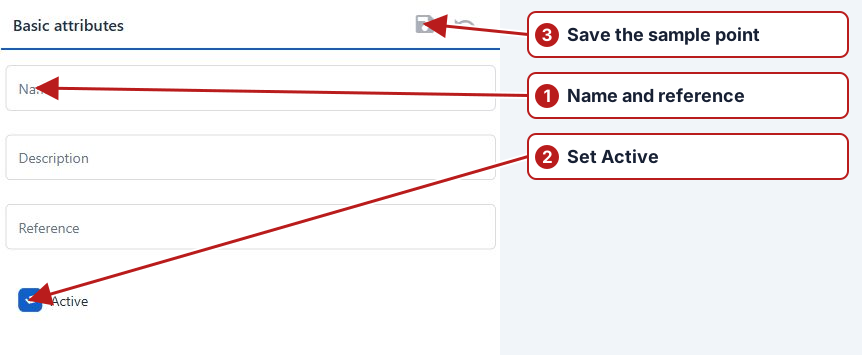
Select a group in the hierarchy and inspect its points. Search the point pane or use filters to find an existing definition. Define a clear name and reference; review Active and the Groups associations, including From/To dates. Reusing a point in multiple groups preserves one measurement location rather than duplicating its identity.
Laboratory codes and the Ad hoc placeholder
Store laboratory identifiers in custom attributes and choose the matching attribute on each supplying organisation. Unknown imported locations can appear under the system’s Ad hoc placeholder. Review creation Events and the source file before associating a new point with its proper group.
Configure appropriate notification rules for import-created points if that activity needs review. Fix ambiguous or missing identifiers rather than repeatedly creating unmatched locations.
QR labels
Generate labels through the available group or point QR action. Review System > Settings > QR code for dimensions and included fields, then print and check labels at their physical locations. A group label and a point label refer to different scopes.
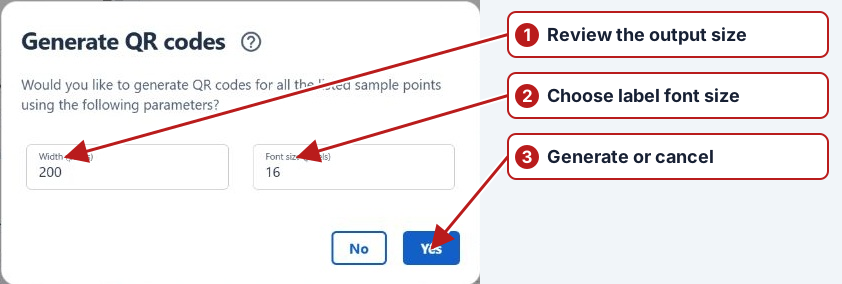
Use the Mobile app scanner to filter downloaded tasks by a group or sample-point QR label. Sync before field work so the device has the locations and tasks. See QR label generation for label setup.