
What happens when a limit is breached
Data-entry limits
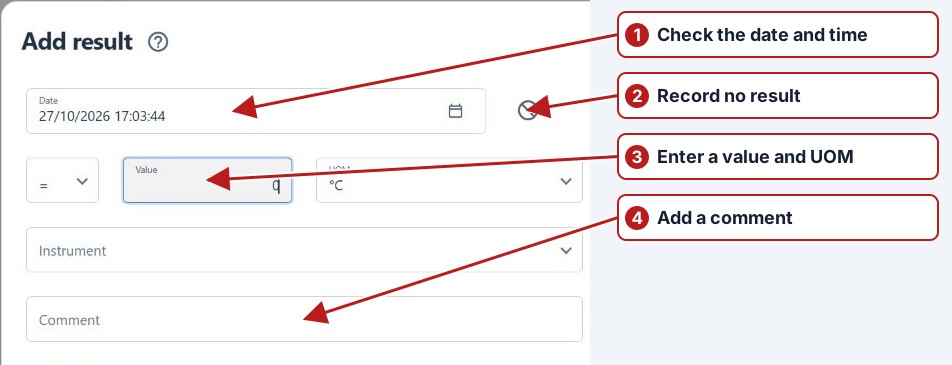
The result editor checks limits when the value changes and again before saving. A data-entry breach displays an error and prevents the result from being submitted. Check the value, unit, instrument and date, then correct the entry.
Alert limits
An alert breach requires a Comment. The warning dialog lists the breached limits and asks Continue using this value?. Choose No to return to the entry, or Yes when the value and explanation are correct.
See Investigate a breached result.
Optional and mandatory issues
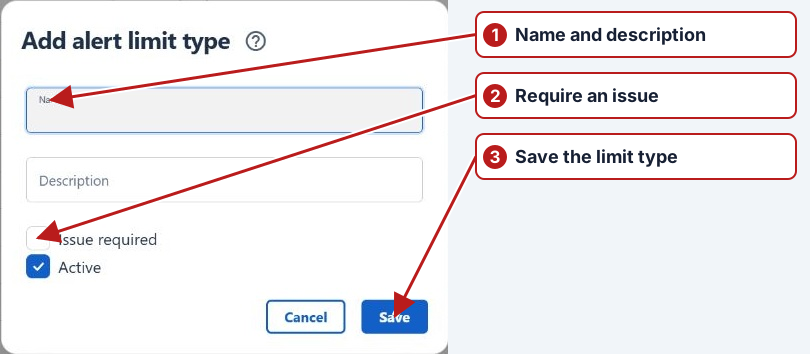
Review the alert limit type’s issue requirement. An optional issue can be linked for an investigation; Issue required triggers the background creation described below. Always check the saved result and its linked issue rather than assuming the old Windows sequence of dialogs applies.
Example review
If a value exceeds an alert threshold, confirm the value, unit, applicable location/date and comment before accepting it. If it also breaches a data-entry limit, correct the invalid entry: acknowledging an alert does not override a blocking validation rule.
Record the investigation through the linked issue and check its classification and status.
Required issue processing
When a breached alert type has Issue required, the background limit-checking process creates an issue linked to the submitted result. It records the breached limits and assigns the issue to the result user. Refresh the result and use Go to issue when the link is available. Processing can follow submission, so check the recorded outcome before creating a duplicate issue.
For a separate optional investigation, create an issue and use the saved result’s Link result to issue action. This is the current web workflow; it does not require the old Windows issue-creation dialog to appear before the result can be saved.