
Set up sample collection
Define Container types, Sample types and Sampling methods under Samples before using them in program sample definitions. Each catalogue describes a different part of the work.
| Catalogue | Purpose | Example |
|---|---|---|
| Container type | The container required for collection | 1 L bottle |
| Sample type | The kind of sample and whether collection is required | Water, with Sampling required selected |
| Sampling method | How the sample is collected | A named collection procedure |
Add a container type
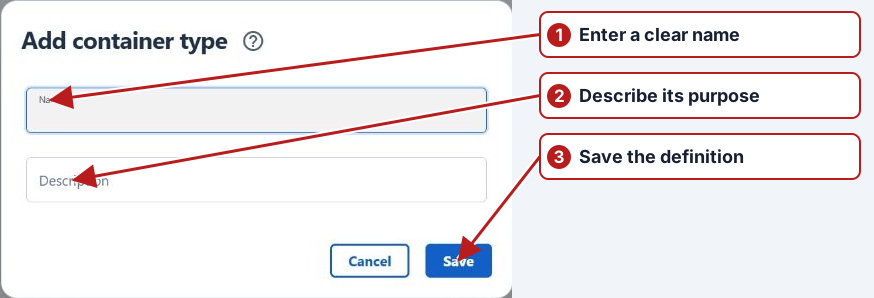
- Open Samples > Container types. Search first to avoid creating the same type twice.
- Click Add new.
- Enter Name and a useful Description, such as the container’s size and purpose.
- Click Save, or Cancel to discard the editor.
Add a sample type
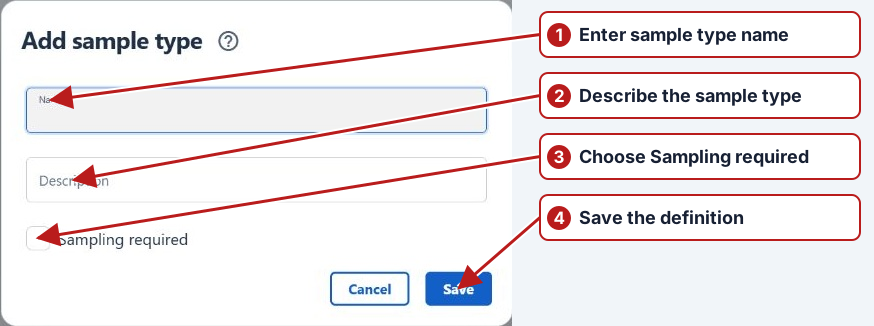
- Open Samples > Sample types, search the list and click Add new.
- Enter Name and Description.
- Choose Sampling required according to the work: tick it when a sample must be collected; leave it clear for an immediate measurement such as a meter or probe reading.
- Review the choice and click Save.
Add a sampling method
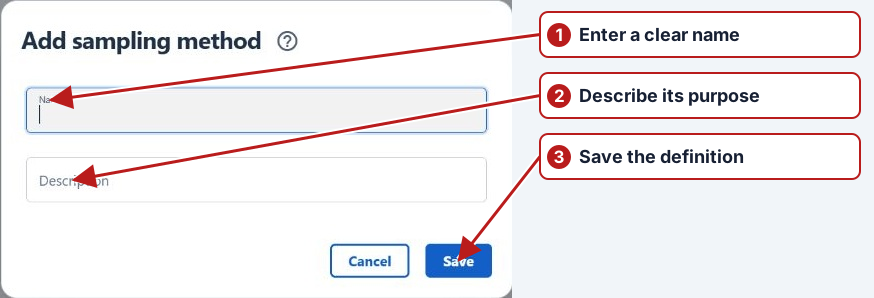
- Open Samples > Sampling methods, search the list and click Add new.
- Enter the procedure’s Name and Description.
- Click Save.
Edit or remove a catalogue entry
Select its row to reveal Edit and Delete. Double-clicking a row also opens its editor. Save the revised fields or Cancel to discard them. Before deleting, check whether program definitions already use the entry and read any confirmation or dependency error.
Use the definitions in a program
Open a program’s Sample definition and select its sample type. Where sampling is required, choose its sampling organisation and method; also choose the testing organisation. Add the required container types through the definition’s Containers pane. Saving a catalogue entry alone does not add it to every program.
See Set up programs, Organisations and Parameter test methods.