
Security explained
Access combines user accounts, role membership, permissions and partitions. Signing in identifies the user; the assigned roles determine the available records and operations.
User accounts
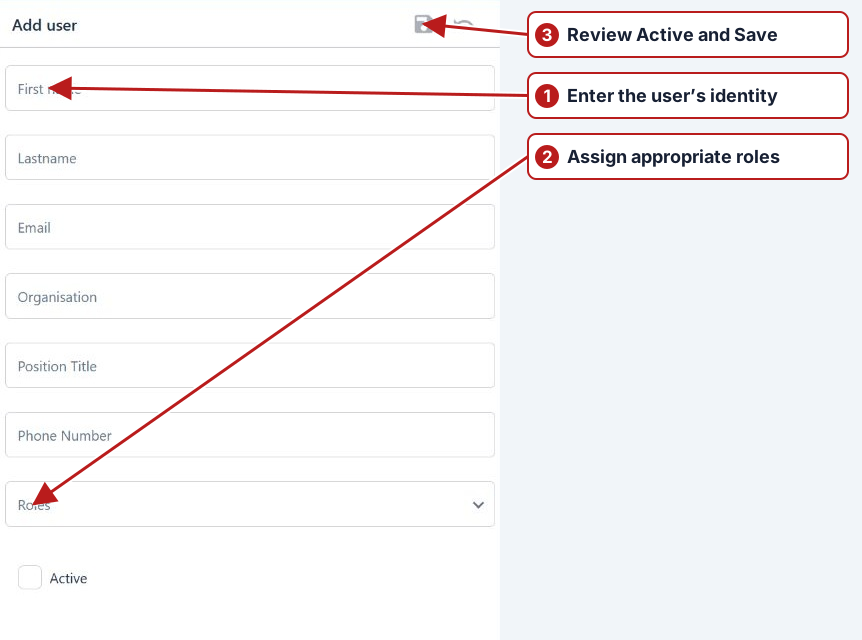
An administrator manages the user’s identity and Active state, then assigns appropriate roles. The current web app uses its configured sign-in flow. Windows shortcut single sign-on, Import from Active Directory buttons and native-mobile PIN setup are not the current user editor workflow.
Roles and permissions
A user can belong to more than one role. Review all those roles when diagnosing access. Distinguish searching/viewing, setup edits, result submission, own/all result edits and administration according to the permissions actually listed in the role.
| Operational need | Access to review |
|---|---|
| View work at a site | Search/view permissions and the site’s partition |
| Record measurements | Result submission and appropriate editing permissions |
| Maintain programs | Program-edit permission and applicable partition access |
| Administer access | User/role administration permissions |
Partitions
System sample-point groups define business partitions, such as Drinking Water and Wastewater. A role’s partition assignments restrict the accessible locations. A person allowed to enter results in Drinking Water does not thereby gain access to Wastewater records.
Diagnose an unavailable action or missing record
- Confirm the signed-in account and its Active state.
- Check all assigned roles and the required operation permission.
- Review partition assignments and the relevant sample-point hierarchy.
- Check site selection, browser filters and inactive state.
- Ask the administrator to change access only if the person’s work requires it.
See Partition hierarchy example and Set up users.