
Data menu
Use Data to find scheduled work, record sampling and results, investigate events, import laboratory files and run reports. Tasks includes sampling work, result entry and recorded results; Result charts provides chart review.
Tasks: find work for a site and date
Open Tasks, review the site and date filters and click Search. Select the intended site in the app header where site-based filters are used; confirm the actual filter values before searching. Add Program, parameter, testing organisation or pending-status filters when the result set is too broad.
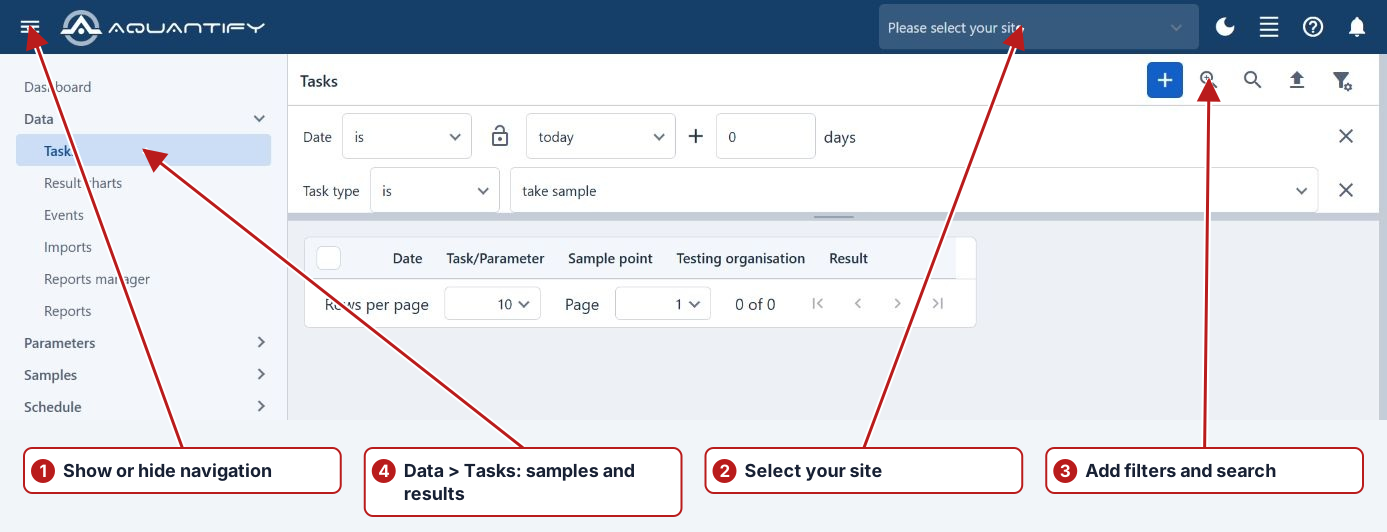
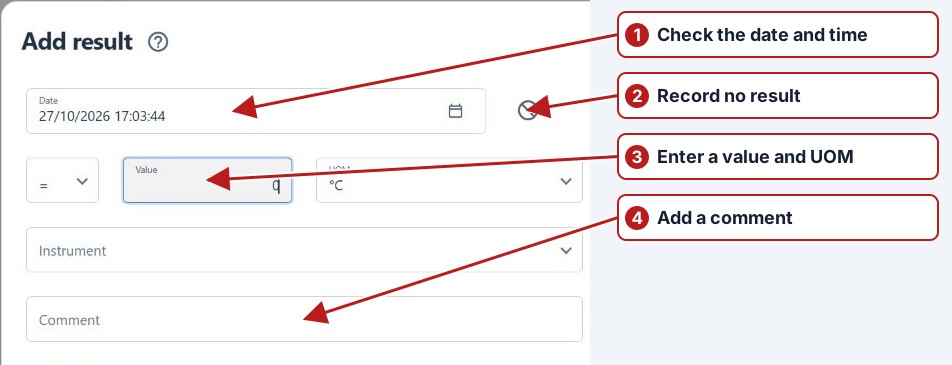
Open a Take sample task to record Sampled or Not sampled. Open an Enter result task to enter a measurement or No result. Calculated tasks use their method expression and source results. Row actions provide the task-specific history, program, scheduler or limit information offered by that browser.
Go to the program
Use the task’s program navigation action to inspect the definition responsible for the task. Check its sample definition and test series when a location, parameter or period is unexpected. Return to Tasks and refresh the search after an approved program change.
Results and the toolbar
Use Tasks to search recorded measurements and inspect their method, unit, date and location. Open Result charts for chart review. Use Add ad hoc result for an unscheduled measurement. A result belongs to the selected sample point and parameter; verify both before entry.
Filters, folders and saved searches
Add filter selects a search criterion. Set its value and click Search; changing a filter does not itself confirm the resulting records. Manage saves reusable sets, applies existing sets and shows recent searches. Give saved sets names that describe their purpose and use folders to organise routine searches.
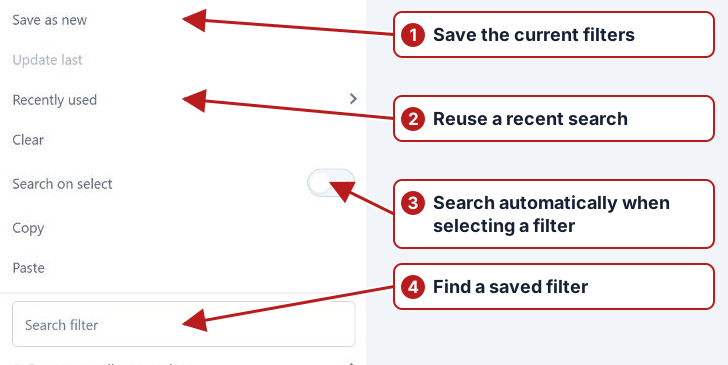
To create a folder, use the folder action offered in Manage and give it a meaningful name. Search within Manage to locate folders or filter sets. Clear the current filters before an unrelated investigation; check whether a saved set contains a relative date that moves with today.
Useful searches
| Question | Filters to start with |
|---|---|
| What is due at this site? | Site/location, date and pending status |
| Which program produced these tasks? | Program, location and date range |
| Which results need a breach investigation? | Location, date and the browser’s breach criterion |
| What did a particular laboratory supply? | Testing organisation, parameter and result date |
| Which records have supporting evidence? | Has attachments plus location and date |
Sort a sortable column to change its ascending or descending order. Narrow the filters before loading a large period. Use a cancellation control when offered during loading; the Windows help’s fixed row-count and toolbar buttons do not describe every current browser.
Charts and multiple parameters
Add a chart series for each parameter and location to compare. Review the chart date range, Follow filters state, unit and series type. Pin a series to retain it while changing the context, and use the chart manager to organise saved series. Reuse axis is useful for compatible units; separate dimensions need separate axes.
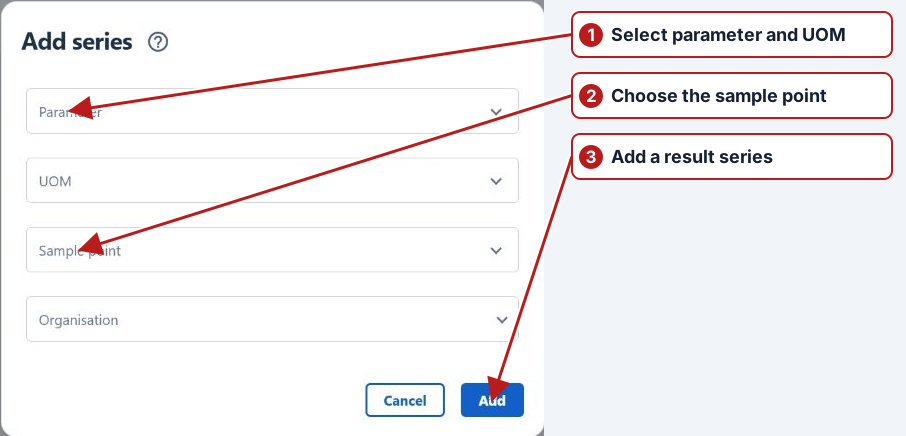
See Results graphs and Multiple-parameter examples for date ranges, pinned series and axis choices.
Events
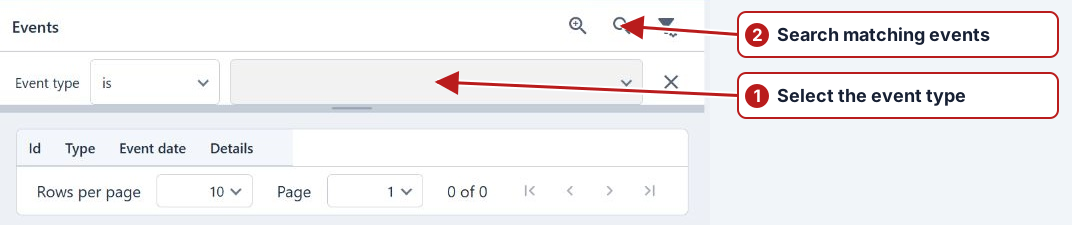
Search Events by date, type and relevant entities to investigate imports, program changes, breaches and other activity. Open a matching event to read its details; the message and affected records provide more evidence than the event type alone.
Reports and result imports
Reports provides report selection and its parameter dialog; review all required parameters before running it. Imports provides laboratory-file upload, parsing status and details. Its matching depends on organisation identifiers, column mapping, applicable methods and units.
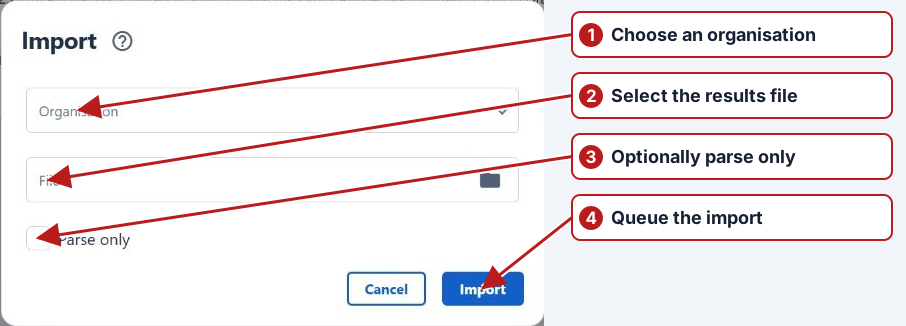
See Run reports and Laboratory import setup and validation.
Current reporting and chart workflows
See Manage report definitions, Schedule reports and Manage saved charts for reusable outputs and sharing.
For selection scope and shared updates, see Bulk task operations.