
Aquantify dates
Dates can describe a definition’s applicability, a scheduled task’s period, the time a sample was collected or the time a result was recorded. These meanings are related but not interchangeable.
Definition dates and active state
Current entity editors use Active where shown. Associations such as method locations and group memberships can also have From/To dates. A test series has its own recurrence range and a duration for each occurrence. Check the fields on the relevant definition rather than assuming every record has the Windows effective/expiry controls.
Relative and absolute browser filters
An absolute date range is fixed. A relative range such as today or this week moves with the date on which the search is run. Relative filters are useful in saved daily searches; fixed dates are useful for reproducing an investigation.
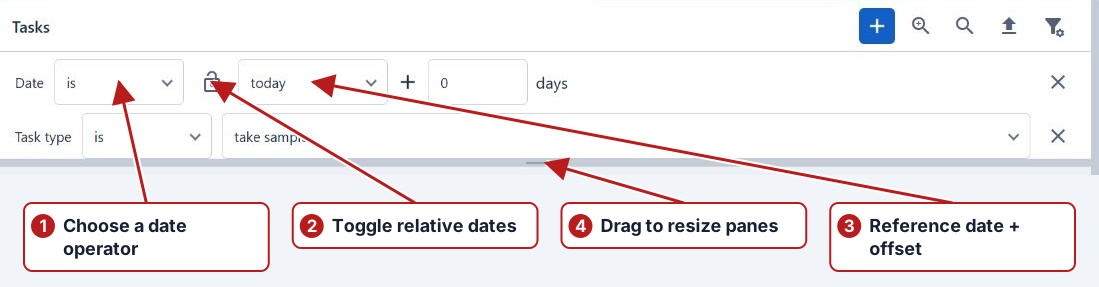
Review the selected date field as well as the interval. A task-period search answers which scheduled work overlaps the chosen range; a result-date search answers when measurements were recorded. A saved filter does not freeze a relative date range.
Multi-day tasks
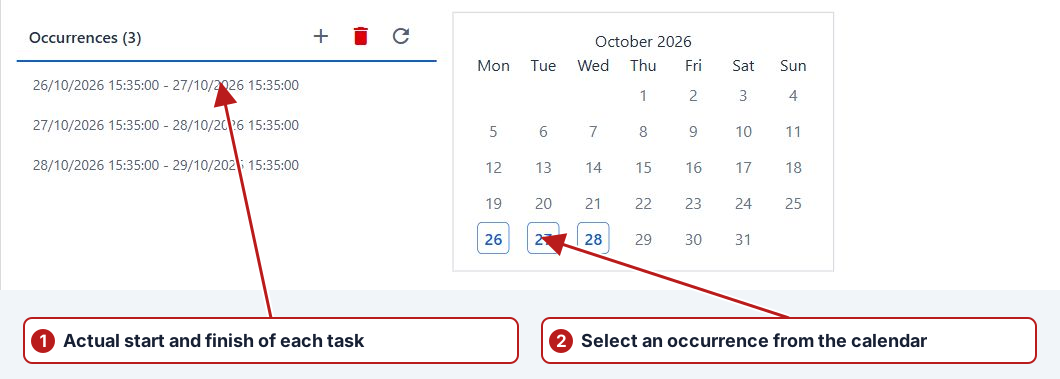
A duration defines the period from an occurrence start to its end. For example, a task starting Monday at 08:00 with duration 6.00:00:00 finishes Sunday at 08:00.
| Search or view | What to expect |
|---|---|
| Task period overlapping Wednesday | The Monday-to-Sunday task can be relevant |
| Occurrence calendar | The start is Monday; inspect the list for the full period |
| Result recorded Friday | Friday describes the result time, not a new task start |
| Five-day aggregate | The calculated task must cover the intended source tasks |
Consecutive periods and boundaries
Review precise start and end times when one task follows another. A reporting day or week is not necessarily midnight-to-midnight if the program starts at another time. Results at the boundary must be interpreted according to the selected task and calculation function’s period rules.
Relative week and day choices
When configuring a relative search, review the week-start/week-end or day-offset choices actually offered by the filter. Confirm the resolved dates with the resulting records. Do not infer that a recurring Monday task and a browser’s This week filter share the same exact start and finish.